Self-hosted LanguageTool with Docker: your own spell-check server in ten minutes
How to run a LanguageTool server with Docker, connect it to LintGrafía in Chrome or Edge so the text you check never leaves your network and, if you need it, add the n-gram data and share it with your team.
By Javier Tenjo, Full stack developer
On this page
LintGrafía checks the spelling and grammar of a page the way its visitors see it, and to do that it hands the text to LanguageTool. By default it uses the public API, which is free and plenty to get started. But it has two limits that eventually matter: it allows about 20 requests per minute, and the page text leaves your network.
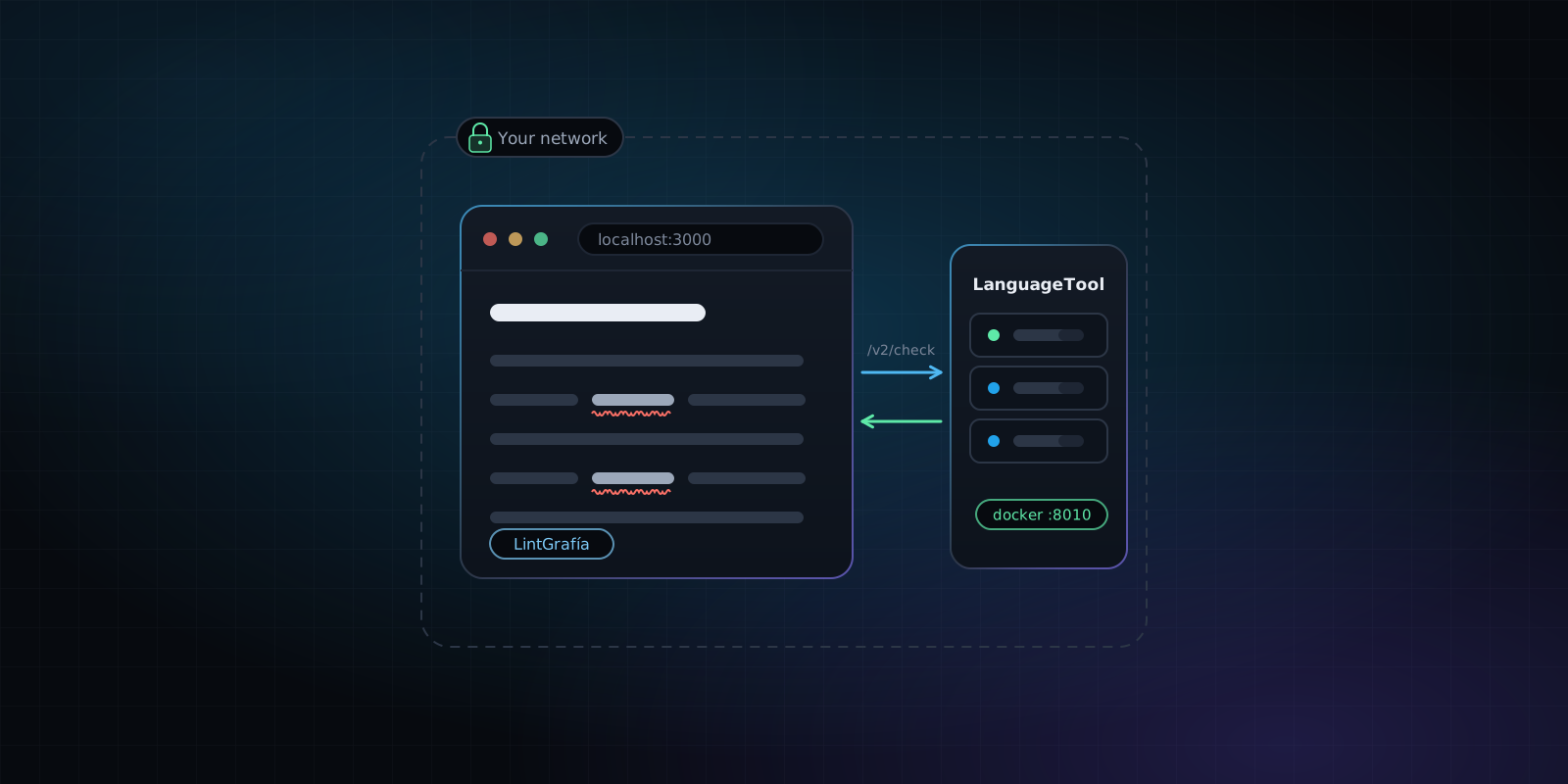
LanguageTool is open source (LGPL), and its server can run on your machine or on a company server. With Docker it takes one command. This guide covers how to start it, how to connect it to the extension and what to know before opening it up to your whole team.
Why run your own LanguageTool server?
- Privacy. Staging is full of text that is not public yet: a launch, pricing, test data with real names. With your own server, that text never leaves your network.
- No request limit. The public API cuts off at around 20 requests per minute, and a long page or a review session across many screens gets there fast. On your server, the limit is your hardware.
- Speed. A server on your machine or your network answers faster than one on the other side of the world.
There is one trade-off worth being clear about: the server you install is the open-source edition of LanguageTool. The premium rules from its paid service are not included. For spelling, agreement and most grammar errors you will not notice, but the difference is there.
What do you need?
Docker and some free memory. The image is about 430 MB and, with its default settings, Java uses up to 512 MB. If you check several languages or add the n-grams (see below), give it a bit more.
Step 1: start the container
LanguageTool does not publish an official Docker image. The most widely used one is erikvl87/languagetool, maintained by the community, which tracks the official releases and listens on port 8010:
docker run -d --name languagetool --restart unless-stopped -p 8010:8010 erikvl87/languagetoolCheck that it responds by asking for the list of languages:
curl http://localhost:8010/v2/languagesThen run a test check:
curl -d "language=en-US" -d "text=We will recieve the order." http://localhost:8010/v2/checkThe response is JSON with an error on “recieve” and the suggestion “receive”. If you see it, the server works.
If you would rather keep it in a compose.yml, with memory tuned and the version pinned (the latest tag moves on its own, and it is better to choose when to upgrade):
services:
  languagetool:
    image: erikvl87/languagetool:latest  # replace with the version you want to pin
    ports:
      - "8010:8010"
    environment:
      Java_Xms: 512m
      Java_Xmx: 1g
    restart: unless-stopped
Step 2: connect LintGrafía
- Open the extension options: right-click its icon and choose Options (in Edge, Extension options).
- In LanguageTool server URL, enter
http://localhost:8010, with no trailing slash. - Click Test connection and, if it responds, Save.
You do not need to configure CORS on the server or start it with --allow-origin. Requests are made by the extension’s service worker, not by the page, so the same-origin policy does not apply.
One important detail if privacy is the reason you are doing this: if your server does not respond, LintGrafía falls back to the public API so you are not left without a check, and the panel shows it as “public API, fallback”. If the text must never leave your network, check that label before scanning a sensitive page.
Step 3 (optional): add the n-grams
With the n-gram data, LanguageTool gets better at catching words that exist but do not fit the sentence: confusions like “their” and “there”, or “affect” and “effect”. No dictionary flags those errors, because both words are spelled correctly.
The data is downloaded from the LanguageTool website and only exists for some languages, with compressed sizes along these lines:
- English: about 9 GB.
- Spanish, German and French: about 1.7 GB each.
- Dutch: about 1.2 GB.
Unzip them into a folder with one subfolder per language (ngrams/en, ngrams/es, each with its 1grams, 2grams and 3grams), mount it in the container and tell the server where it is:
docker run -d --name languagetool -p 8010:8010 \
  -e langtool_languageModel=/ngrams \
  -v /path/to/ngrams:/ngrams:ro \
  erikvl87/languagetool
They take disk space and a little more memory, so an SSD is the better home for them, and only for the languages you actually check.
What if the whole team wants to use it?
Run the same container on an internal server and have each person enter its address in the LintGrafía options (for example, https://languagetool.yourcompany.internal). Two precautions:
- The LanguageTool server has no authentication. Anyone who can reach it can use it. Do not publish it openly on the internet: keep it inside the company network or behind a VPN, or restrict it by IP in the reverse proxy in front of it.
- The extension does not send a username or password, so protecting the server with basic auth would lock the extension out too. The restriction has to be at the network level, not with credentials.
The custom dictionary is still stored in each person’s browser. To share your product’s vocabulary across the team, export it as JSON from the extension and import it on the other machines.
In short
The public API is the quick way to start, and to check your site now and then you need nothing more. When the text is sensitive or you check every day, your own server removes the request limit and keeps the text on your network. With Docker it takes ten minutes.
LintGrafía is free and needs no account. It is on the Chrome Web Store, which also serves Brave and Opera, and on Microsoft Edge Add-ons. If you want to know why we built it and what exactly it checks, we cover that in LintGrafía: spell-check a website the way your customers see it.